

WooCommerce
Import Export
Plugin for Products, Orders & Customers
If you've ever tried to manage 10K orders one at a time or just spent a day with your team grouping orders straight into a spreadsheet, you understand the problem. This plugin prevents that.
One-click import and export for WooCommerce offers you easy control over your WooCommerce import and export tasks. Import and export WooCommerce products, orders, customers, coupons, ratings, categories, and tags all from one screen, without writing any code.
A quick method for true importing and exporting. Advanced methods are available for additional filters, mapping options, and configuration settings. Either way, your WooCommerce records will be processed in minutes.
Here’s what it handles:
- Import and export WooCommerce products, orders, customers, and coupons in bulk.
- Advanced filtering is best for exporting and importing what you really want.
- Smart Column Mapping — Auto and manual.
- Save import and export templates for regularly running jobs.
- Full import and export logs so nothing happens outside the record.

Woo Import Export Plugin
for Products, Orders & Customers
Managing thousands of WooCommerce records one by one is slow and painful. Our plugin lets you import and export products, orders, customers, and coupons — all from a single screen, in just a few clicks. No coding required, no complicated setup.
Whether you're migrating a store, syncing data, or running a weekly report, your records will be processed in minutes — not hours.
Here’s what it handles:
- 7 Data Types
- 4 Export Formats
- Scheduled Jobs
- Templates
Features
One plugin. Every data operation your store will ever need
WooCommerce Import Export Plugin — Every Feature Your Store Needs.
Premium Feature
Key Feature

Google Sheets Integration
If your team is already using Google Sheets for product listing, pricing tables, inventory management, or customer data, are you worried about downloading a CSV file every time for changes and uploading manually? With our import and export plugin You can simply connect your Google account and point the plugin to the correct spreadsheet and sync the data directly to your store without saving a local file.
Key Feature

Smart Column Mapping
Your CSV doesn’t always fit into WooCommerce’s field names, and that’s okay. The plugin usually maps columns where it can and helps you manually map the rest before importing a row.
Key Feature
Bulk import and export
It shouldn’t take hours to import products in bulk or pull the entire order record.Run bulk imports and exports without splitting files or running multiple import/export runs.
Advanced Filtering
Export your entire database when you need orders for the simplest part of the month. Filter by date, status, category, product type, and more. Export only what you need, nothing else.

Reusable Import Export Templates
If you visit the same import or export every week, save it as a template. You can then click on one later. All your filters and column settings stay already configured and ready to run.

Background Import
Once you get started with importing, the data will keep running on the server in the background. Even after you close the browser window, data will be successfully imported without any technical issues. So you can continue your work and the import will finish automatically.

Meta Fields Support
The plugin supports both standard and custom fields, including meta fields, for complete import and export flexibility. Whether you're importing ACF fields or custom meta fields, smart field mapping makes it easy to match and manage your data accurately.

Scheduled Import & Export
You can schedule your import and export in advance, and this premium plugin will handle everything automatically in advance. Simply, you can schedule the date and time. Using this feature will save you time and reduce the manual work, and you can keep your store data up-to-date.
Premium Feature
FTP, SFTP, and URL Import
Using this WooCommerce import/export plugin, you can import files via FTP/SFTP and URLs. Simply connect the plugin to the remote file location and import data into the store following a few steps. This is perfect for those who are looking for a supplier’s feeds and large product files. You can keep your sensitive information safe and secure. You can directly connect the plugin with any source file in your FTP/SFTP location and it will automatically use it to import data. You can also use a third party file URL.

Advanced Filters & Customization
Get complete control over your import and export process with flexible filtering and duplicate-handling options. The plugin can match existing records by ID, SKU, email, or other unique identifiers, allowing you to skip, update, or import records as new based on the selected data type. Flexible settings help you avoid conflicts and keep your data accurate.

Import and export logs
This plugin keeps a history of all import and export operations. You can review the status, execution time, and processed records in history. Detailed logs help you track activity and debug issues.

Global Settings and Screen Controls
Set default file limits, choose your preferred import and export method, and adjust performance settings to keep your server’s capacity healthy. You decide how the plugin runs.
Premium Feature

Bundle Import & Export
If you are managing the store, you want to import and export complete woocommerce data as a bundle. This feature is perfect for handling everything in one single operation. You can import and export products, orders, customers, coupons, reviews, categories, and tags with a single file It allows you to import all data in one go without worrying about multiple different files.
Premium Feature
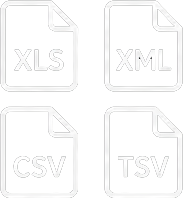
Excel, XML, CSV, and TSV Support
In WooCommerce, different teams work with different file formats according to their platforms. Our import and export plugin eliminates that barrier completely by supporting the four most widely used data formats. These formats include Excel (.xlsx), XML, CSV, and TSV. So you don’t need to waste time converting files and directly import them in your WooCommerce store.
One workflow
One Plugin for Every WooCommerce Import Export Task
Most owners just use it to process their data or create three separate tools: one for products, another for some orders, and something else for customers. It works, but it’s messy, costly, and slow.
Advanced import export for WooCommerce brings all that under one roof
Whether you want to migrate WooCommerce data to a new store, import products in bulk, export the order data to your billing team, or import customer data, all running from the same plugin, screen, and workflow.
No switching between plugins or workflows. It can be exported from one plugin and imported into another. Why buy three subscriptions when one works?
Here's what store owners actually use it for:

Running a store?
WooCommerce information migration is one of the most essential components in changing hosts or redesigning stores. Export everything — products, orders, customers, and coupons — as a CSV and import it cleanly into a new repository. Done.
Managing your catalog?
Instead of changing products one by one within WooCommerce, import your product list in bulk in one spreadsheet and run a WooCommerce bulk product import. Products can be imported in bulk using CSV files.

Export order data?
WooCommerce Order Export lets you pull exactly whatever orders you want, filtered by date, status, or users, and immediately deliver the CSV to your crew or accountant.

Managing customers?
WooCommerce Customers Import makes it easy for users to bring over customers from any other platform or import new customer records in bulk without touching the database.

Running an agency?
If you manipulate two stores, you can import and export WooCommerce products and data to customer stores without repeating the same manual work each time.
Advanced import export for WooCommerce brings all that under one roof
Whether you want to migrate WooCommerce data to a new store, import products in bulk, export the order data to your billing team, or import customer data, all running from the same plugin, screen, and workflow.
No switching between plugins or workflows. It can be exported from one plugin and imported into another. Why buy three subscriptions when one works?
Data types
Import and Export Every Type of WooCommerce Data
Most import and export plugins support products and stop there. This plugin covers all important statistic types for your WooCommerce store so that you don’t have to look for a second tool at all.
Here is everything you can import and export:

Products
The most used function. Import products in bulk, or export your entire inventory for editing or migration. Supports simple products, variable products, and product versions. WooCommerce product import/export works with all known product fields, including price, inventory, snapshot, categories, and attributes.
Orders
Draw order records for any level, any status, or any customer. WooCommerce order export gives you a clean CSV with all the order information your crew or accountant needs without redundant copy.

Customers and users
Transfer customer data between stores, bulk upload new customers, or import existing profiles. Customer import covers every WordPress role — customer, subscriber, shop manager and custom roles — along with billing and shipping addresses, with no manual database editing.
Coupons
Import coupon data in bulk instead of building them internally in WooCommerce one at a time. Useful for massive advertising campaigns or migrating deal information from another platform.

Product Review
Export reviews from your current store or import them into a new one at some stage of the WooCommerce listing migration. Store your social proof intact outside of leaving a review.
Categories and Tags
Import product categories and brands in bulk to quickly set up your store structure. Especially useful when creating new stores or rearranging current inventory.
Quick and Advanced Import Export Modes
Two Ways to Import and Export - Pick What Works for You
Not every import and export operation is the same. Sometimes you just want to get stats in or out quickly. Other times, you want to keep close tab on what’s being exported and how it’s being imported. This plugin offers you both.
Quick Import/Export
Get data in and out in a few clicks
The quick mode is exactly what it sounds like. Open your CSV, verify the fact type, and run. No filters to configure, no column mapping to set up, and no settings to adjust.
If you have a clean report and understand what you are importing, quick mode will do it in a few clicks. This is the fastest way to handle standard WooCommerce import and export tasks without going through full configuration each time.
Best for
- Importing a supplier product CSV into your store
- Exporting a full customer list for a newsletter campaign
- Running a quick WooCommerce order export for your records
- Moving data between stores during a migration
Advanced Import Export
Full control when accuracy is critical
When you want extra manipulation, Advanced Mode includes everything from Quick Mode, plus additional options for mapping, filtering, and customization.
Seek clear terms before exporting so you can easily pull the records you really need. Select the exact columns you prefer to export to each field. Set file boundaries in the size store with the help of IDs.
Advanced WooCommerce import and export methods are designed for situations where accuracy is critical. Import large product datasets efficiently without touching the ones you need to hand over to yourself. Shipping of the most efficient finished orders from a given date range. If an ID already exists, the plugin lets you skip the record, update the existing record, or import it as a new record.
This is where the plugin wins its place for developers and businesses dealing with complex WooCommerce stores.
Filtering
Export Only What You Need — Nothing More
One of the most significant frustrations with the primary WooCommerce export tools is that they sell a bunch of them. You ask for orders, and you get every field, every column, every record — while all you really need is 30 days to close orders that end with usernames and totals.
Advanced filtering in this WooCommerce import-export plugin prevents that completely.
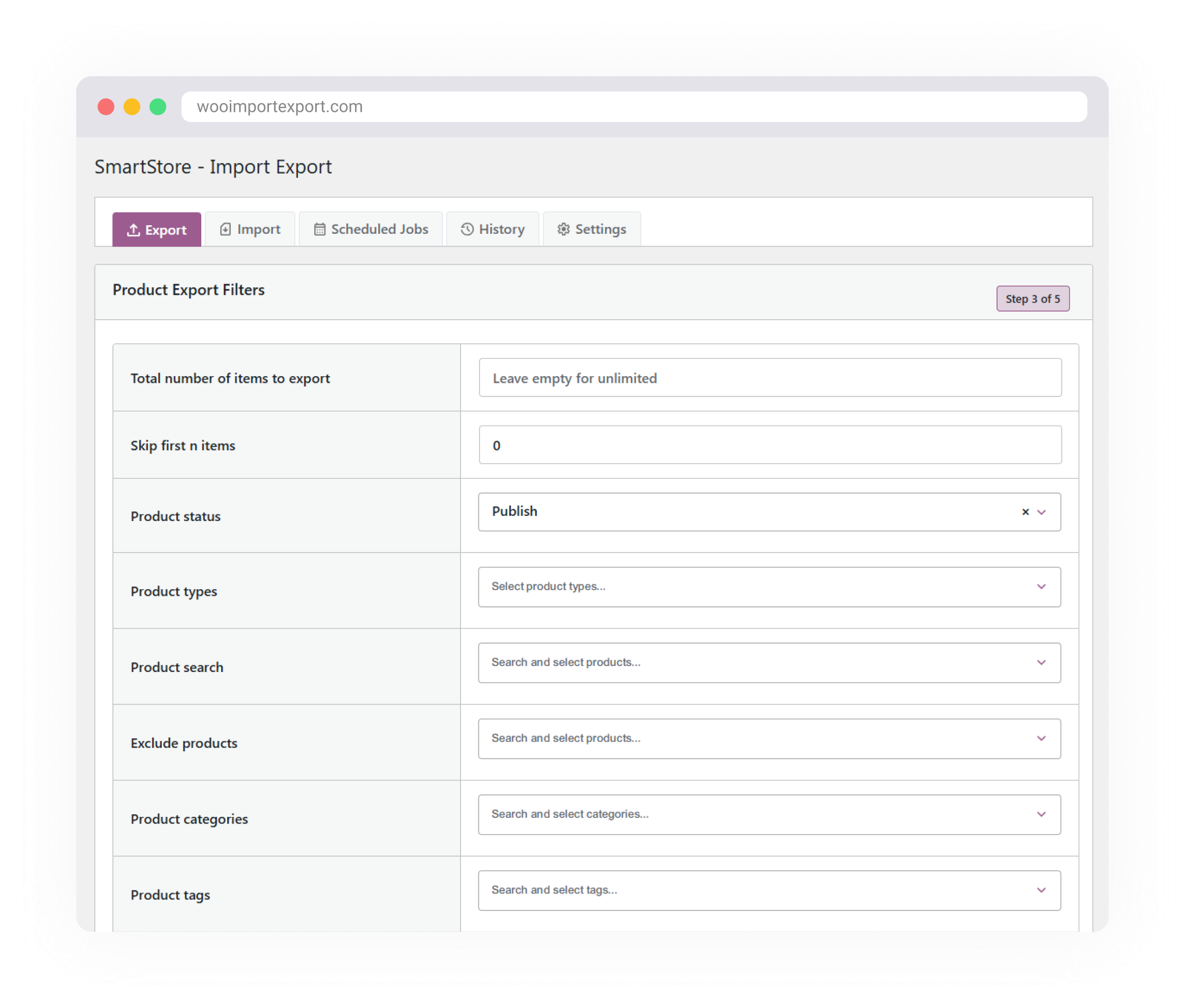

Filter Before You Export
Before you visit any export, you can follow specific conditions to narrow down exactly what you receive by subscribing. Filter WooCommerce products by category, type, tags, or status. Filter orders by date range and payment status. Filter customers by task or signup date.
You don’t filter inside a spreadsheet after the fact. You tell the plugin exactly what to export before running the process, so the CSV you obtain is already accessible and ready to be consumed.

Select Only the Columns You Need
In addition to filtering information, you can additionally choose which columns appear for your output. If you share order data with your logistics team, they may not want a payment process or discount. Choose the areas that count the most and leave comfort alone.
This makes WooCommerce CSV import and export documents significantly cleaner, less complex to read, and faster to work with, especially when you’re dealing with large data units.

Set Record Limits
For stores with thousands of records, it is not always wise to export everything at once. Establish a file limit to export in segments and ensure the process is compatible with all server configurations.
Whether you are exporting selected WooCommerce orders or pulling a filtered product list to a selected supplier, the filtering tool offers you control that basic export tools definitely no longer offer.
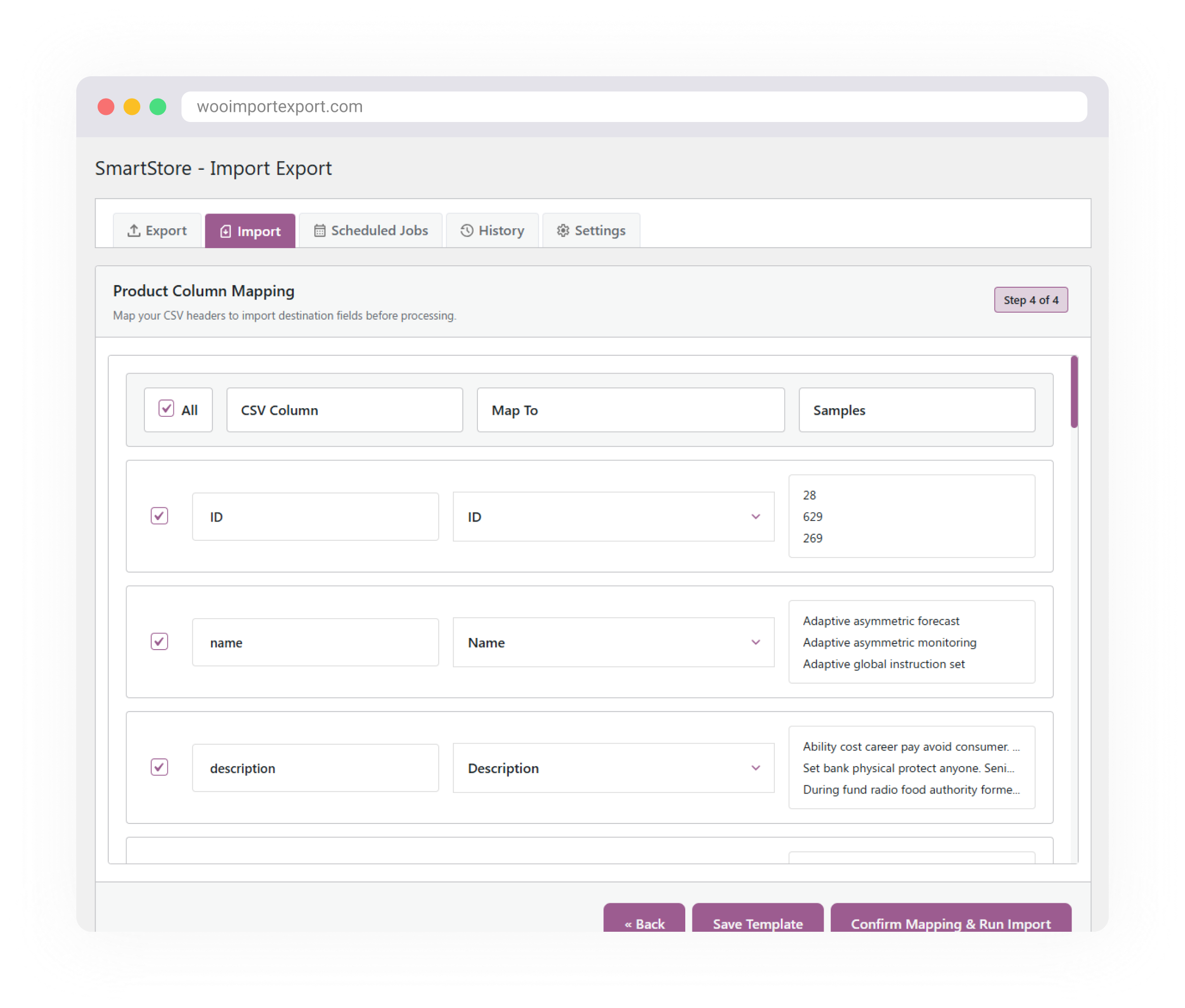
Mapping
Import Any CSV Without Worrying About Column Names
Every store organizes information differently. The provider CSV will not have the same column headers as WooCommerce. Documents exported from all other platforms use certain field names in full. That discrepancy is one of the common reasons for import failure or the production of dangerous data.
The column mapping system in this WooCommerce import and export plugin solves it before writing the modified file to your database.

Auto Column Mapping
When you open a CSV, the plugin reads your column headings and mechanically matches them into the appropriate WooCommerce fields where it could. For popular documents with familiar titles, the maximum mapping is achievable for you without any guiding images.
Manual Column Mapping
For columns that the plugin can’t match mechanically, you get a clear mapping view screen where you assign each catering column to the correct WooCommerce field automatically. You can see exactly what is mapped before anything is imported so there are no surprises after the fact.

Handling Existing Data
If the imported ID already exists, you can choose to skip the record, update the existing record, or import it as a new record, depending on your import settings.
Templates
Stop Setting Up the Same Import/Export Job Twice
Some import and export tasks aren’t one-time jobs. Many store owners run the same imports and exports every week—pulling orders for their billing team, updating product prices from supplier records, and syncing customer data between stores. Without a template, that means repeating the same setup every time.
The design of this WooCommerce import and export plugin removes that repetition entirely.
Save Your Configuration Once
After setting up your filters, selecting your columns, and deciding on your input and output settings, save the entire layout as a template. Everything will be saved, including your record type, filters, column selections, and import control options. The next time the same task comes up, your entire configuration is already ready.

Reuse it when you need it
Reuse your saved template whenever needed, verify the file, and run it. No more filters, no more mapping columns, no more remembering which settings you applied the rest of the time. The entire setup is just as you left it, ready to be accessed in a few clicks.

Built for regular users of agency
If you manage more than one WooCommerce store or run statistical operations on a regular schedule, reusable WooCommerce import/export templates save huge time. Create a template once for each store or type of challenge and reuse as often as you like.
History & logs
Import/Export History, Logs, and Workflow Steps
Always know what happened to your inventory data.
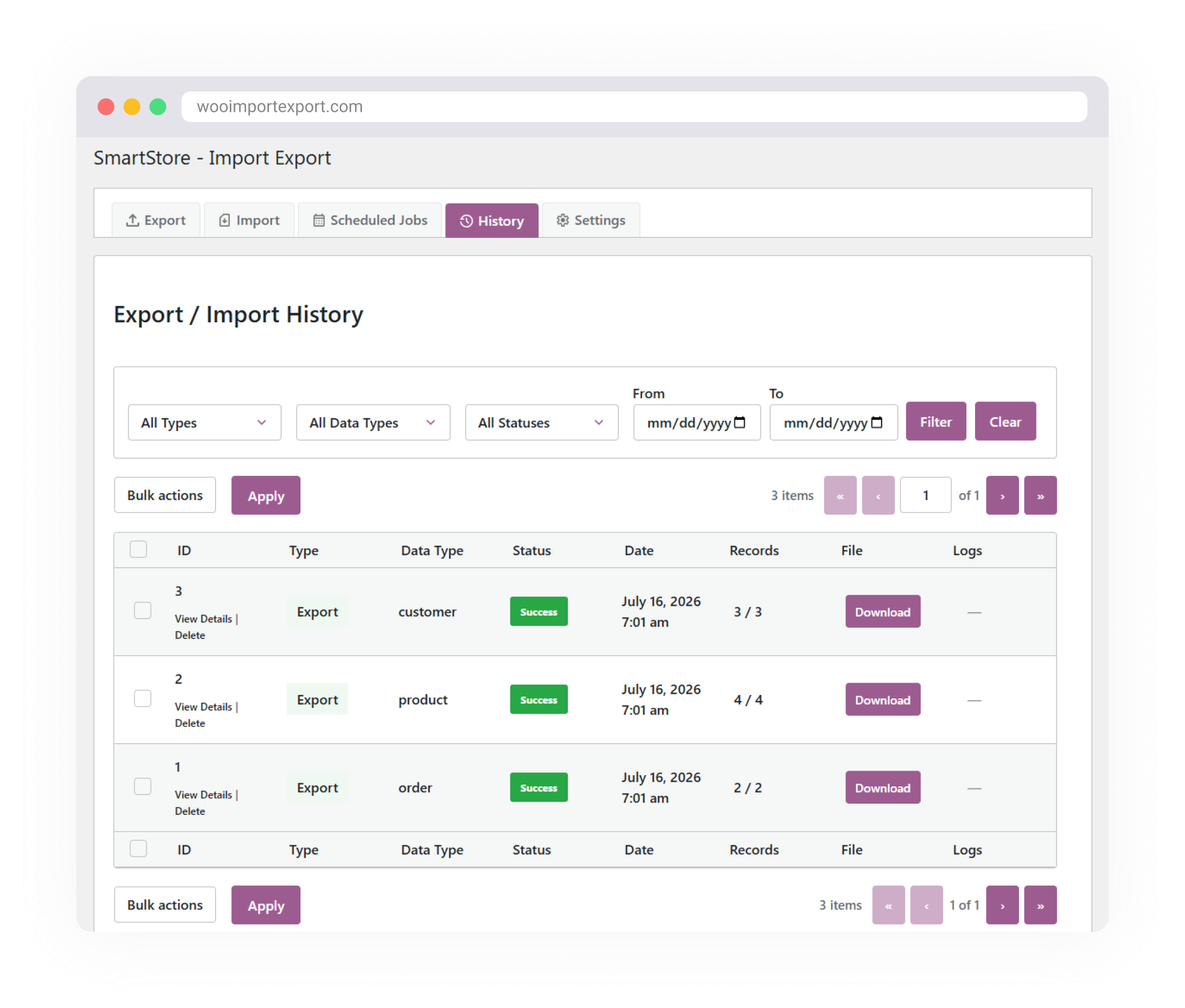
Live trades pose risks in moving imports and exports. Incorrect documentation, inaccurate mapping, or confusing reproductions can cause real issues. The activity logs and history tool in this WooCommerce import and export plugin provides full visibility over every task running.
Track all imports and exports
Every time you run an import or export, the plugin logs it automatically. You can see the type of information, the amount of data covered, the execution time, and the ultimate status of each job. Nothing runs silently within inheritance without notice.

Identify problems with detailed logs
If the import does not go as expected, the designated logs will tell you exactly what went wrong. What data failed, why it failed, and what the plugin did with it. Troubleshooting is honest if you have a clear log to work with.

Review your entire operating history
The history section stores a complete record of every import and export operation. Review past jobs, view execution details, and track what changed and why. This is especially useful for businesses managing WooCommerce data transfers across multiple stores or partner stores.
Your store data deserves better than manual work.
You’ve spent a lot of time on repetitive imports, messy exports, and registry errors. A plugin handles everything: products, orders, customers, coupons, and more, just as you need it to.



Simple, scalable pricing.
No extra charges. No hidden fees.
Choose the perfect plan for you
All plans include free updates, premium support, and a 30-day money-back guarantee.
1 Site
Perfect for personal projects and small websites.
Save 0%
- Use on 1 website
- 1 Year of updates
- Premium support
5 Sites
Great for freelancers and growing businesses.
$948 vs. paying monthly Save 83%
- Use on 5 websites
- 1 Year of updates
- Premium support
25 Sites
Ideal for agencies and developers managing multiple clients.
$1188 vs. paying monthly Save 81%
- Use on 25 websites
- 1 Year of updates
- Premium support
30-day money-back guarantee. No questions asked.
Get Help When You Need It
If you are looking for help with setup, import/export configuration, or troubleshooting, the plugin includes help and support with assistance to take you through the process.
Frequently Asked Questions:
-
Which WooCommerce data types can I import and export?
Products, orders, customers, coupons, product reviews, product categories and product tags. The premium plugin covers all seven together; the free versions are split into three plugins by data type.
-
What is the difference between the free and paid versions?
Free is three plugins on WordPress.org: Products (products, reviews, categories, tags), Orders (orders and coupons), and Users (customers and WordPress users). Each does full CSV import and export, updates records that already exist, maps columns, saves templates, batches large files and logs history. Paid is a single plugin covering everything, and adds Excel, XML and TSV files, Google Sheets, scheduled jobs, FTP and SFTP imports, bundle operations across every data type at once, rollback, background import, and ACF field mapping.
-
Does the plugin update existing records?
Yes, in both free and paid. A record matching by ID, SKU or email address is updated rather than duplicated, and a confirmation popup reminds you to back up first. The paid version adds control over how duplicates are handled.
-
Can I import WooCommerce products in bulk using CSV files?
Yes. Upload a CSV, map your columns to WooCommerce fields, and run the import. Large files process in batches so they do not time out, and variations import alongside their parent products.
-
Which user roles are supported during customer import?
Any WordPress role: administrator, editor, author, subscriber, customer, shop manager, or a custom role. The paid version adds ACF and custom user meta mapping.
-
Can I export WooCommerce orders with advanced filters?
Yes. Order exports filter by date range, order status, customer, coupon, product, or a list of order IDs, so you can pull only the records you need for accounting or reporting.
-
Does the plugin support automatic and manual column mapping?
Yes. Recognised CSV headers are matched to WooCommerce fields automatically, and anything unmatched can be mapped by hand before the import runs. Columns you leave unmapped are ignored.
-
Can I save reusable import and export templates?
Yes, in both free and paid. Save a column mapping as a named template and load it whenever a file arrives in the same layout.
-
Does the plugin keep import and export logs and history?
Yes. The History tab records every operation with status, record counts, execution time, error details, and a download link for exported files.
-
Which file formats are supported?
Free handles CSV, with a selectable delimiter: comma, semicolon, tab, pipe or a custom character. Paid adds Excel (XLSX), XML, TSV and Google Sheets.
-
Can I move an entire store to a new site?
With the paid version, export a bundle containing all seven data types as a single ZIP and import it on the new store. With the free plugins, export each type separately and import in order: categories and tags, then products, then customers, then orders.
-
Where can I read the documentation?
The full knowledge base is at wooimportexport.com/docs, covering both wizards, scheduling, rollback, settings and troubleshooting. Articles describing paid-only features are marked at the top.